

 15 minutes read
A law firm can be busy with billable work and still struggle to turn that work into collected cash. Time entries sit incomplete, invoices wait for approval, a client rejects a bill over a missing matter code, or a payment arrives without anyone knowing which account it belongs to. Billing management services coordinate the work between recording time and posting payment, with named owners for routine tasks and clear attorney approval points.
For a solo or midsize firm, the answer usually isn't to buy more software or hire someone to “handle billing.” It's to map the invoice-to-cash cycle, define who may act and who must approve, then use tools and remote support within those boundaries. This guide covers the tasks involved, a workable weekly rhythm, safe delegation, hiring and platform checks, pricing choices, and ways to measure whether the arrangement is helping.
A toll road can carry heavy traffic and still lose revenue if some gates fail to register cars. In a law firm, the “gates” are time entries, rate application, invoice delivery, payment posting, and follow-up. Billing management services cover the ongoing administrative work that moves billable time through those gates, not just the act of generating an invoice.
| Task | What It Involves | Common Owner | Attorney Review Needed |
|---|---|---|---|
| Time-entry review | Checks completeness, matter codes, and narratives before billing | Billing coordinator | Yes, for write-downs and disputed entries |
| Invoice preparation | Applies agreed rates and client billing guidelines, then formats the invoice | Billing coordinator | Yes, before first send and for unusual invoices |
| Trust accounting support | Records deposits, disbursements, and ledger entries against client matters | Trust-trained bookkeeper under firm control | Yes. State rules govern the process |
| Collections follow-up | Sends reminders, reviews aging reports, and proposes payment plans | Billing coordinator | Yes, before escalation or write-off |
| Payment reconciliation | Matches payments to invoices and matters and clears exceptions | Billing or bookkeeping staff | Yes, for unmatched or disputed receipts |
| Reporting | Tracks aged receivables, billing realization, and collection realization | Practice manager | Yes, for trend-based decisions |
Sending an invoice is one handoff in a larger workflow. Someone needs to check time and matter data, prepare the bill, confirm the client's submission requirements, track whether it was accepted, match incoming funds, and flag late or unclear payments. These tasks commonly sit inside practice-management systems such as Clio or MyCase, alongside bookkeeping or payment tools.
The boundary is as important as the task list. Staff can format narratives, schedule reminders, and post a payment when it matches an open invoice. Rates, write-offs, fee disputes, and trust-account decisions remain under firm authority, with attorney review where appropriate. Start by listing every billing task your firm performs this month and writing down its owner. Any recurring task without a clear owner is a candidate for support or a better-defined handoff.
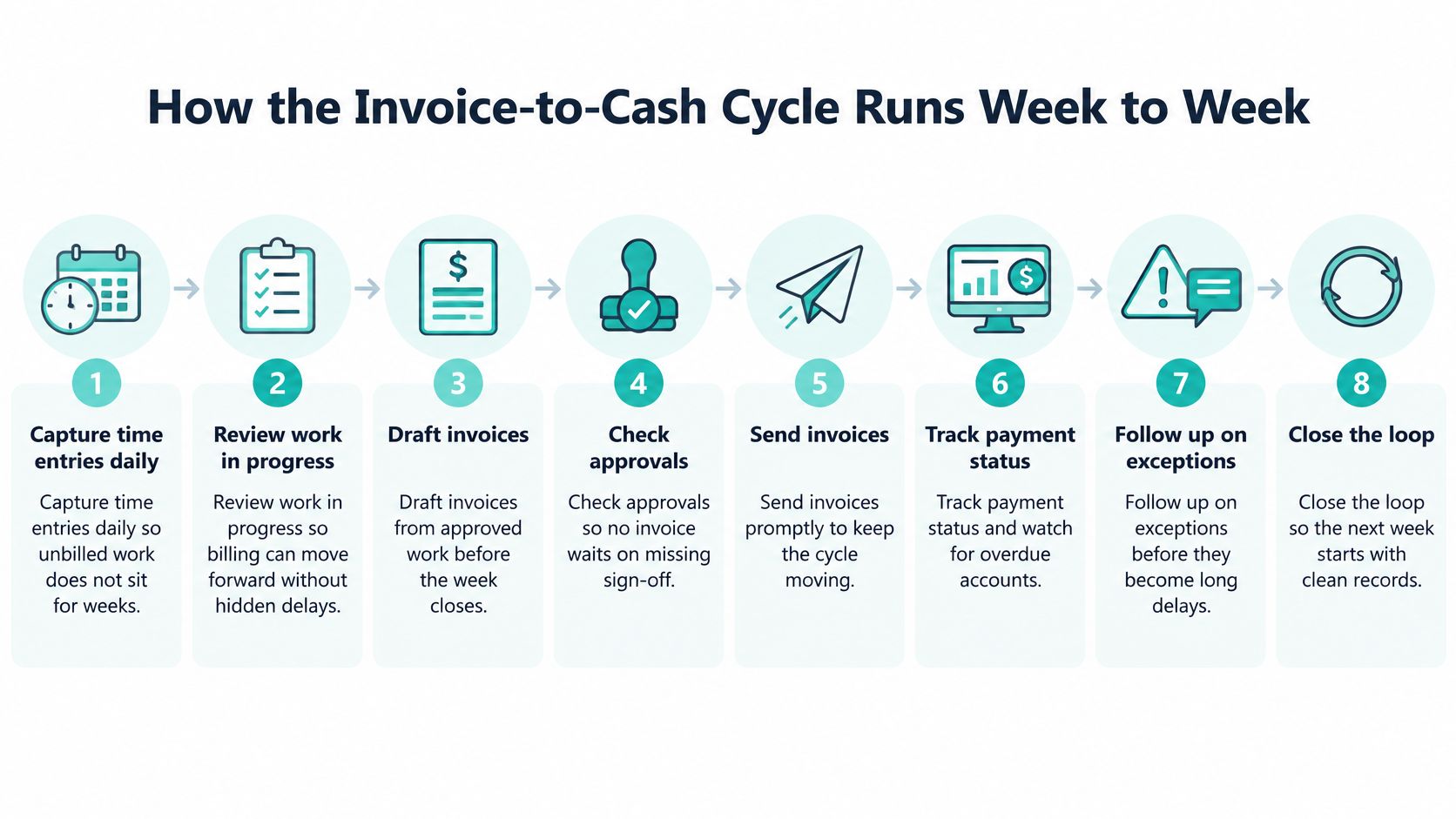
A prebill sits in a partner's inbox all week while the client waits on the invoice, and nobody notices because each person assumed someone else owned the next step. That is where most billing delay starts in a small or midsize firm: at the handoff between steps. A weekly rhythm with a named owner for each exception keeps the work moving.
Two things decide whether this rhythm holds: who has approval authority at steps 2, 3, and 7, and who owns each exception queue when something fails to match. A firm that writes those names down will outperform one that buys software and leaves the queues unstaffed.
The legal-finance scorecard reports 59 average days to bill versus 35 days for best-in-class firms, 52 average days to payment versus 40, billing realization of 92.8% versus 98%, and collection realization of 92.3% versus 98.1%. Gaps like these compound across a portfolio: modest leakage on many matters means less of the work billed or collected. The scorecard recommends monitoring billing lag, days to payment, realization, and aged receivables rather than treating invoice delivery as the only measure.
Treat these figures as one benchmark. A smaller practice can run a lighter weekly schedule, but its dashboard should still separate delay caused by unbilled work from delay caused by client review or payment. Segment results by practice area, responsible attorney, client, matter, and e-billing status so the manager can see which owner needs to act.
Payment technology can make it easier for clients to pay, but it won't fix unclear invoice narratives, late billing, mishandled trust procedures, or ownerless follow-up. In a 2025 survey, 68% of firms reported difficulty collecting fees, while 59% said integrating payment processing with billing software accelerated collections, according to the 2025 Legal Industry Report. The operational lesson is that a tool needs a human owner and a defined escalation path.
| Tier | Examples | Who Decides | Review Required |
|---|---|---|---|
| Tier 1: routine | Formatting time entries; template reminders; exact-match payment posting | Assistant within a written task list | Spot checks by billing owner |
| Tier 2: delegated with review | Invoice drafts; reconciliation exceptions; e-billing submissions | Assistant prepares; attorney approves | Attorney approval before send |
| Tier 3: attorney only | Write-offs; fee disputes; retainer replenishment; trust determinations | Attorney or firm principal | Not delegable |
A remote assistant can own repeatable work, such as sending reminders from approved templates or posting a payment that exactly matches an open invoice. That gives the firm a reliable person responsible for routine follow-through and can reduce attorney time spent on invoice housekeeping. The assistant can also prepare drafts and collect information for exceptions, but preparation isn't approval.

Practical rule: If the action changes a fee, affects trust funds, or resolves a dispute, route it to the attorney rather than giving the assistant discretion.
For example, suppose an assistant finds a $4,000 payment that matches no open invoice. The right response is to record it in an exception queue, preserve the payment details, and ask the designated billing owner to investigate. Guessing the matter might incorrectly affect client records or trust accounting.
The model may not fit firms with very low billing volume that can't justify a recurring commitment, complex multistate trust work that should remain with licensed bookkeeping support, or approval windows that don't overlap with the assistant's working hours. A lawyer's supervision responsibilities remain in place whether the assistant is an employee or an independent contractor. ABA Model Rule 5.3 calls for reasonable measures and supervision so nonlawyer conduct is compatible with lawyers' professional obligations. Set written task boundaries, approved communication channels, review procedures, escalation rules, and confidentiality training before delegation begins. Trust-account requirements can vary by state, so confirm them with applicable state bar guidance and ethics counsel.
Screen for billing competence, not general administrative confidence. Ask candidates to describe their hands-on work with time entry, invoice generation, and payment posting in a named platform such as Clio or MyCase. Then give them a practical exercise: review ten sample time entries and flag missing matter numbers and narratives too vague to support an invoice.
Ask how they would handle three scenarios: an unmatched payment, a rejected e-billing submission, and a client request to change a rate. Strong answers identify what information to record, whom to notify, and what they would not change without approval. Check whether the candidate has handled trust-related records under supervision, while making clear that trust decisions stay with the firm.
A careful assistant escalates uncertainty. A candidate who promises to resolve every exception independently may not understand the role's boundaries.
Verify references from prior legal employers, confirm identity, and obtain a signed confidentiality agreement before granting access to firm systems. Align the assistant's working hours with the times attorneys can review bills and clear exceptions. A legal-billing specialist may cost more than a generalist, while a generalist may need more training on matter codes, client guidelines, and the firm's approval habits.
Virtual Legal Assistants' guide to hiring a virtual legal assistant describes a hiring process for law-firm support. The firm still needs to interview its preferred candidate, test the billing tasks that matter to its workflow, and decide whether the candidate's judgment about escalation is sound.
Two firms can run the same billing platform and get very different results. The difference usually sits in who holds approval rights, who clears exceptions, and who can touch which records. Three common setups shape where errors surface: billing inside the practice-management platform, a third-party payment processor connected to that platform, and exports to a separate accounting system.
Each has a known failure mode. Native billing keeps more work in one place, but staff still need to check configuration and matter records. A payment processor can simplify collection, but a payment may fail to post back to the right matter. An accounting export can support bookkeeping controls, but it adds another handoff to reconcile.
Firms may encounter platforms such as Clio, MyCase, Filevine, CASEpeer, SmartAdvocate, and Smokeball. A familiar feature name does not guarantee the feature works the way the firm needs. Confirm each requirement in current vendor documentation and a trial account, then test the full path from invoice creation through payment posting and reporting. This overview of case-management software can help frame platform comparisons.
Before granting a login, ask vendors and internal administrators:
Access control deserves the same attention as integration. Give each assistant a named account, limit permissions to the billing modules their assigned tasks require, and turn on multifactor authentication where available. Prepare an offboarding checklist that removes access and confirms what happens to firm data.
Under their supervision duties, reflected in ABA Model Rule 5.3, lawyers must assess an outside provider's competence, security practices, and confidentiality commitments before granting system access. The firm remains responsible for deciding whether the worker and working environment meet those requirements, including when the relationship ends or a breach is suspected.
Integrations can break after vendor updates. Assign one named person to recheck connections after an upgrade and compare posted payments against processor records. Every payment that fails to post needs a named owner and a deadline. If a midsize firm discovers that its payment link does not write back to matter ledgers, it should run a documented manual reconciliation step until the connection is corrected, with a second person reviewing the reconciliation before invoices close.
Support quotes generally reflect the role, hours, software setup, and whether the firm wants a dedicated person or pooled support. Compare the model against your workload and its likely failure point, not just the headline rate.
| Model | How It Is Billed | Best Fit | Main Risk |
|---|---|---|---|
| Hourly support | Billed for hours actually worked | Firms with irregular billing volume | Costs drift without weekly hour caps |
| Part-time monthly | Fixed monthly fee for an agreed number of hours | Solo and small firms with steady billing cycles | Unused hours or overflow beyond the plan |
| Full-time monthly | Fixed monthly fee for a dedicated assistant | Midsize firms with daily billing work | Higher commitment that needs enough workload to justify it |
| Per-invoice or per-matter | Fee for each invoice or matter processed | Firms with predictable invoice counts | Exceptions and disputes are hard to scope in advance |
| Software-only subscription | Monthly software fee, with staff time handled in-house | Firms with existing billing staff | Staff time still required and often underestimated |
As a published reference point, Virtual Legal Assistants' pricing information lists starting rates from $10 per hour and monthly averages of $1,499 for part-time and $2,499 for full-time support. Exact rates depend on role, experience, hours, and software requirements, so use those figures as a point of comparison rather than a quote for a specific position.
Calculate total cost, not just the service rate. Include software licenses, attorney review time spent correcting drafts, and staff time for onboarding and process documentation. Ask each provider about deposits, placement fees, minimum terms, and what happens when the workload exceeds the agreed hours. Engagement structures differ, and low rates can lose their appeal if the firm must redo work or supervise unclear tasks.
Cross-border arrangements also require attention to worker classification and tax reporting. The IRS guidance on forms and taxes for independent contractors says classification depends on the business's right to control and direct how the work is performed. It distinguishes reporting for U.S. independent contractors, which may involve Form 1099-NEC, from nonemployee compensation paid to nonresident aliens, reported on Form 1042-S. Confirm the worker's tax status and the appropriate arrangement with a qualified tax professional before signing.
For a solo firm handling about 20 invoices a month, compare a part-time plan with a software-only option plus the firm's own labor. The practical question is how many hours each week the current process takes, including corrections and attorney review, and whether that time has a higher-value use.
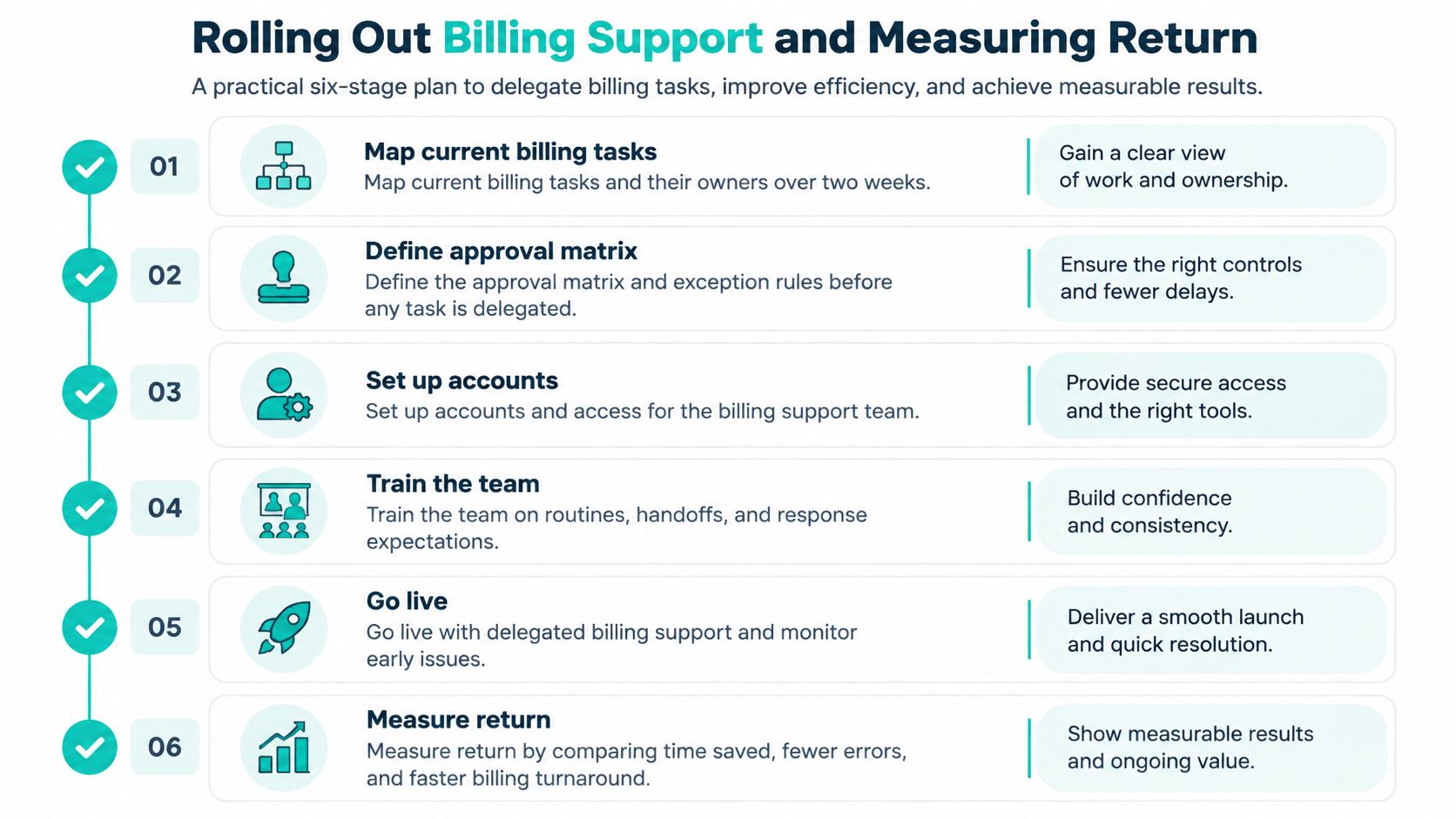
A rollout works best when the firm delegates a controlled workflow rather than handing over a mailbox and hoping tasks find an owner. Use the stages below to define the work, protect approval points, and test results before expanding.
| Metric | What It Measures | Target Direction |
|---|---|---|
| Days to bill | Average days from work performed to invoice issued | Lower is better |
| Days to payment | Average days from invoice issued to payment received | Lower is better |
| Billing realization | Billed amount as a share of worked value after write-downs | Higher is better |
| Collection realization | Collected amount as a share of billed amount | Higher is better |
| Aged receivables | Balances outstanding beyond 60 and 90 days | Lower is better |
| Invoice rejection rate | Share of invoices rejected by clients or e-billing systems | Lower is better |
Measure return as recovered cash plus attorney hours returned, minus service and software costs. In a hypothetical example, a firm recovers $3,000 a month in previously aged receivables and frees six attorney hours. Those gains still need to be weighed against the monthly service fee, software subscription, and review time required to keep the work accurate.
The first quarter may show little return while the assistant learns the firm's matter codes and the team adjusts its approvals. Firms can also overstate savings if they count delegated work as time saved but ignore attorney hours spent correcting drafts. Review metrics monthly, and pause expansion if the exception queue keeps growing.
Billing management services work best as a defined invoice-to-cash process, with a named owner for recurring tasks and attorneys retaining decisions about fees, disputes, and trust matters. Choose the platform and support model only after you know which tasks need attention, where handoffs fail, and what level of review each task requires.
Over the next 60 days, map current billing work, set approval tiers, verify needed software features in vendor documentation and a trial account, pilot the workflow in one practice area, and review the results monthly. Legal, trust-account, and tax obligations can vary by jurisdiction, so confirm them with qualified counsel or advisers.
If your firm wants a shortlist of remote staff screened for U.S. law-firm experience and software familiarity, Virtual Legal Assistants can provide matched profiles, typically within 24 hours, with interviews before selection and no deposit required. Reviewing candidates doesn't commit your firm, and you retain control over the work.