
 16 minutes read
Your attorney asks whether the medical records have arrived. The case manager checks an email thread, the receptionist checks a spreadsheet, and the file shows only that someone sent a request. Nobody can say who owns the follow-up or when the firm should escalate it.
That's the case management law firm owners need to fix before buying another tool or adding another employee. Case management is the operational discipline of moving matters through defined milestones, with a named owner for each next action and an attorney responsible for legal decisions. Software supports that discipline. It doesn't establish it.
For solo and small firms, the challenge is separating work an attorney must perform from coordination someone else can reliably own. At midsize firms, the problem shifts toward handoffs between intake, records, paralegal, litigation, and closing teams. Remote support can help either model, but only if the firm defines responsibilities, review requirements, and escalation paths before granting access.
A workable approach connects task ownership, matter milestones, platform configuration, and performance measures. It also makes the limits of delegation explicit, especially when a bilingual case manager becomes a client's most frequent point of contact.
Say a personal-injury matter sits for six weeks because a records request went to an outdated provider address. The request appears complete in the task list, but nobody owns confirming delivery or following up. The attorney discovers the problem when preparing a demand package.
The failure wasn't just slow records retrieval. The firm treated sending the request as the finish line instead of assigning responsibility for obtaining the records.
A case manager coordinates the operational work from intake through closing. That includes opening files, tracking milestones, organizing documents, requesting records, maintaining calendars, communicating approved updates, and recording what happened. A useful analogy is an air-traffic controller: the controller keeps sequencing clear, while the pilot retains responsibility for flying the aircraft.
In a solo practice, the owner may perform case management personally, often between substantive legal tasks. Delegating coordination helps only if the attorney also establishes when to review exceptions and answer questions.
A firm with two to nine attorneys might assign a coordinator across several lawyers. That person needs a shared priority system, not competing instructions from whichever attorney sends the latest message. A midsize firm may divide ownership among intake coordinators, records specialists, case managers, and paralegals, with explicit handoffs between them.
The term also appears in court-issued case management orders and scheduling conferences. Those concern the court's procedural management of litigation. Internal case management is broader, covering the firm's work before, during, and after court proceedings.

Practical rule: Completing an activity isn't the same as achieving its intended result.
The American Bar Association's 2024 Practice Management TechReport found that 53% of surveyed lawyers reported case or practice-management software was available at their firms, down from 63% in 2022.
Availability doesn't establish whether staff keep records current or use the platform consistently. Someone must maintain the file, resolve missing information, and move exceptions to the right attorney. The case manager's purpose is consistency of execution, not speed alone.
Delegation never transfers the supervising attorney's accountability. The commentary to Rule 5.5 permits lawyers to employ paraprofessionals when they supervise the work and remain responsible for it, as reflected in Indiana's published professional-conduct rule and commentary.
A responsibility matrix translates that principle into everyday decisions. It should distinguish who prepares the work, who reviews it, and who has authority to approve the result.
| Task | Case manager | Supervising attorney |
|---|---|---|
| Opening a matter and recording intake details | Enters data and sends conflict-check request | Approves engagement |
| Calendaring deadlines | Enters dates and cross-checks against rules and source documents | Approves dates that drive filings |
| Requesting medical or agency records | Sends requests, logs responses and follows up | Reviews scope of what is requested |
| Routine client status updates | Sends attorney-approved templates | Reviews any update that interprets progress or outcomes |
| Organizing documents and preparing filing packets | Indexes, assembles and checks completeness | Signs and approves filings |
| Drafting correspondence to opposing parties | Prepares drafts only | Reviews and sends substantive correspondence |
| Advising clients on legal options or likely outcomes | Does not perform | Performs; reserved to the attorney |
| Setting strategy or negotiating settlement terms | Does not perform | Performs; reserved to the attorney |
Think in distinct work categories. Administrative work includes scheduling, indexing, and logging responses. Attorney-supervised legal support includes preparing drafts and assembling filing packets. Reserved attorney functions include legal advice, strategy, and decisions affecting legal rights, subject to any specific authorization under applicable law.
A written inventory of virtual legal assistant tasks can help define a position, but your firm must assign its own review requirements. State rules may impose additional restrictions, so confirm jurisdiction-specific requirements before delegating substantive work.
Role drift usually begins with a reasonable client question. A case manager who provides daily updates gets asked whether a settlement offer is fair, whether a delay hurts the claim, or whether the client should sign a document. Familiarity with the file doesn't authorize an answer.
Give staff a usable response: “I can confirm what we've received and arrange attorney review, but your attorney needs to advise you about that decision.” Then give the attorney a defined escalation queue so routing the question doesn't become another delay.
For example, a case manager may record a newly identified opposing party and flag a possible conflict. They shouldn't tell the prospective client whether the claim is viable or independently resolve the conflict question.
Store your matrix with operating procedures. Revisit it whenever you add a practice area, change staffing models, or expand a case manager's client-facing responsibilities.
A milestone is a verifiable event, such as receiving a signed engagement letter. Working on the file isn't a milestone because nobody can use that description to determine what is complete or what should happen next.
| Stage | Milestone that closes it | Owner | Exception to watch |
|---|---|---|---|
| Intake | First response logged and matter type recorded | Case manager or intake coordinator | First response past your target window |
| Engagement | Signed engagement and conflict decision recorded | Attorney approves, case manager tracks | Conflict check open beyond the normal period |
| Records and investigation | Requests sent and responses logged | Case manager | Outstanding requests with no follow-up date |
| Filing preparation | Filing packet complete and deadline calendared | Case manager prepares, attorney approves | Missing source document for a required filing |
| Discovery or negotiation | Responses or demand package sent | Attorney, with case manager support | Response due date without a named owner |
| Resolution | Outcome recorded and client informed | Attorney | Client update overdue after outcome |
| Closing | Final letter sent, file archived per retention rules | Case manager | Closing checklist incomplete |
These are starting points, not universal stage gates. In records and investigation, logging a response doesn't establish completeness. Your checklist should identify missing providers, date ranges, attachments, or certifications before the file advances.
The simplified lifecycle below shows the distinction between activity and a recorded result.
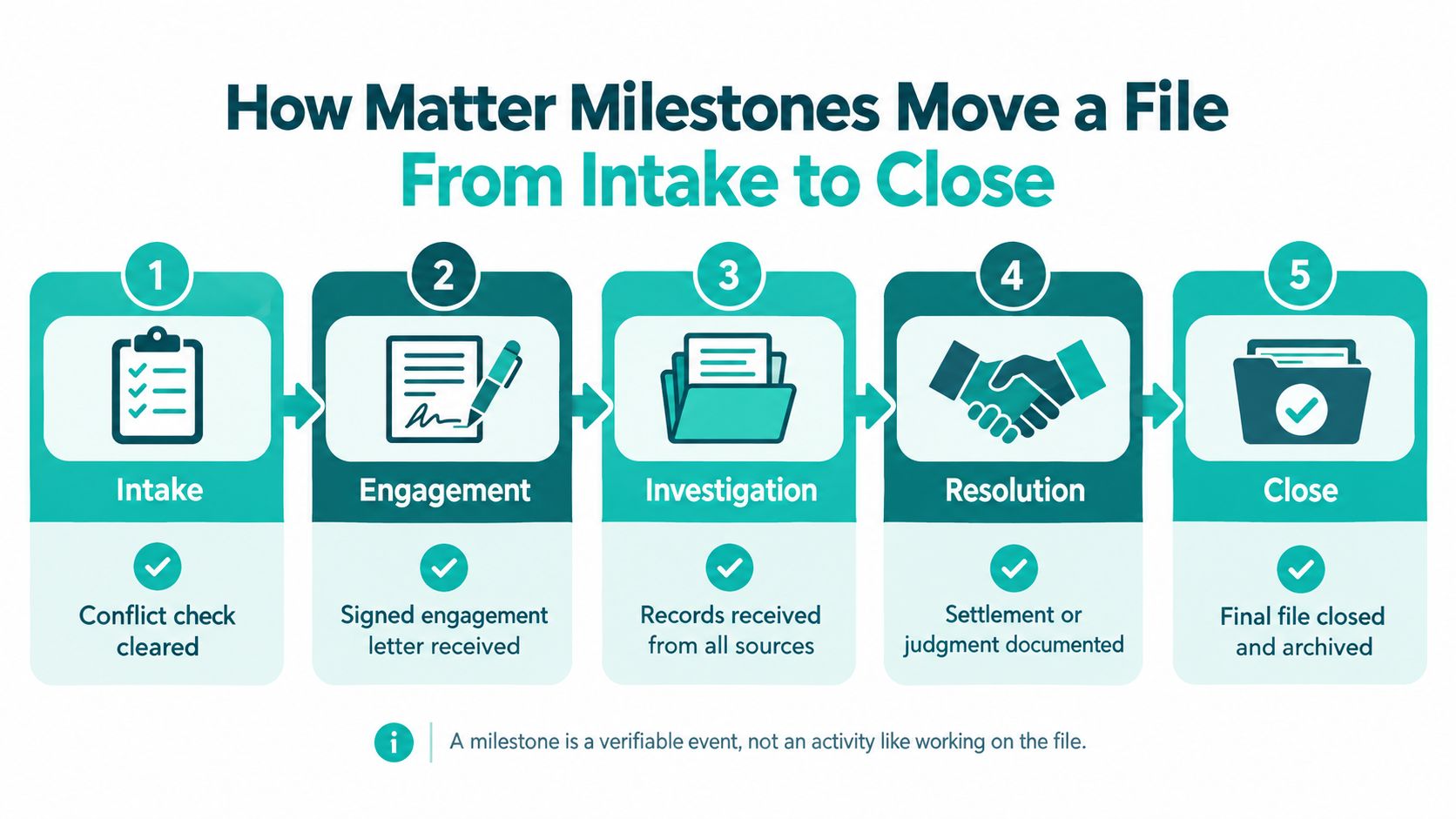
Intake shows how measurable milestones work. In the Legal Trends findings published by Clio, 82% of firms that responded to inquiries did so within 24 hours; an adequate email response required that timing, a clear answer to at least one question about the matter or the lawyer's ability to help, and information about rates or booking a consultation.
An acknowledgment alone therefore shouldn't close your substantive intake-response task. Track whether staff supplied the authorized information and routed questions requiring legal judgment.
Urgent matters shouldn't sit in the ordinary queue. Potentially expiring rights, imminent hearings, and hard immigration or family-law dates require immediate attorney escalation. Before launching the workflow, test it against a small sample of recently closed files and identify where each one really waited.
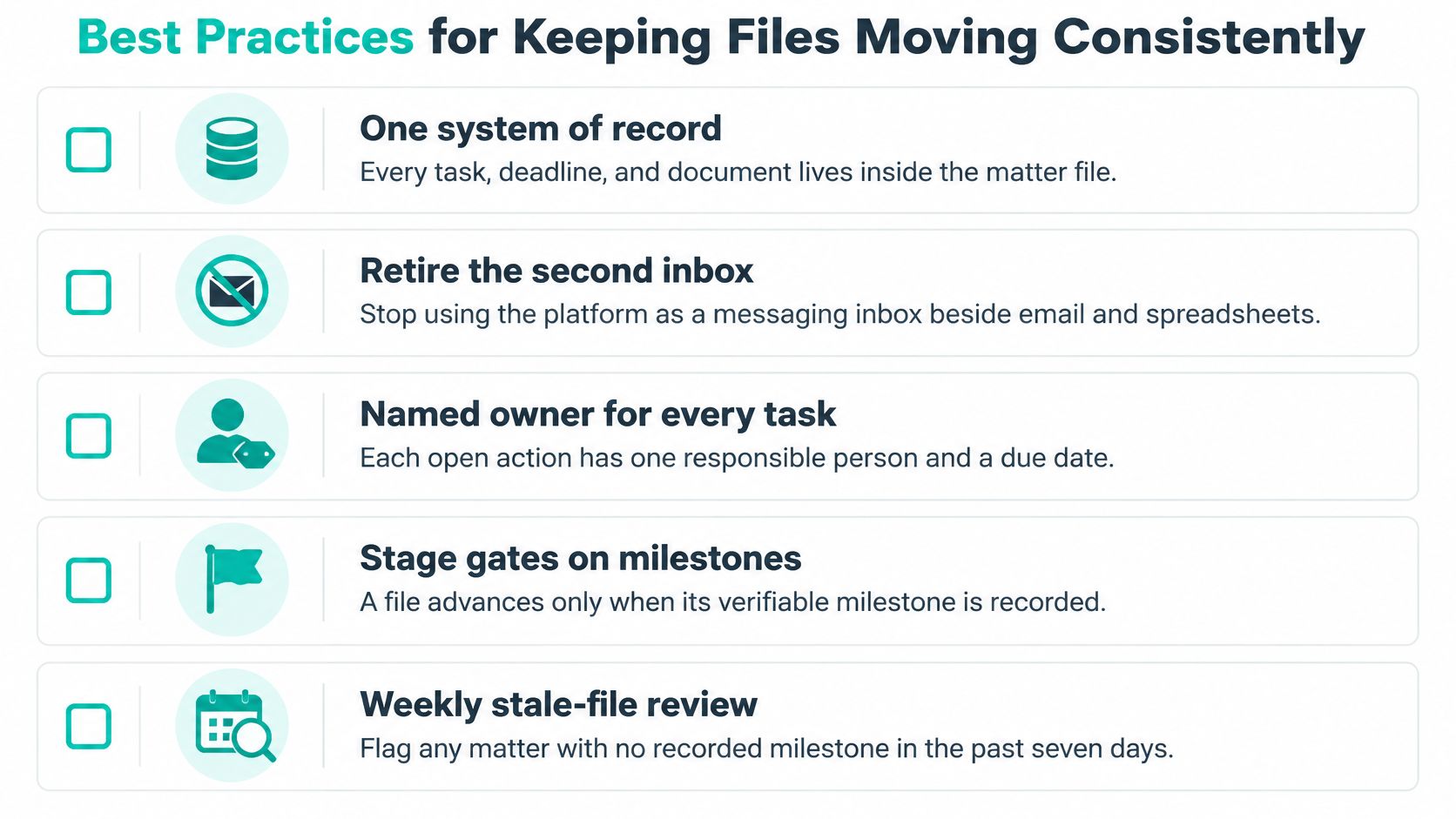
A common mistake is buying a case-management platform and letting it become another inbox beside email and spreadsheets. Staff then spend time deciding which record to trust instead of advancing the matter.
Use the platform as the matter's system of record. Calendars, documents, client messages, tasks, and billing should reference the same matter record through supported integrations and defined procedures. Clio's Legal Trends report connects practice-management use with integrated workflows across these operational functions, rather than treating software ownership as the finish line.
Use the checklist as a review prompt, not a requirement to manufacture activity on legitimately waiting matters.
| Mistake | What it causes | Fix |
|---|---|---|
| Matter opened with no next-action date | Deadlines and follow-ups discovered late | Require next action and due date on the opening template |
| Parallel spreadsheets kept beside the platform | Conflicting dates and unreliable reports | Declare the platform authoritative and retire side trackers |
| Status labels that differ by person | Dashboards that cannot be compared | Use fixed statuses with written definitions |
| Duplicate client or party records | Conflict-check gaps and billing errors | Search for duplicates at every new intake |
| Permissions broader than the role needs | Unnecessary exposure of confidential material | Apply role-based permissions and review quarterly |
A reminder attached to an unowned task creates noise, not control.
Automation should follow assignment rules, not substitute for them. A small docket can use a lean template, while a larger operation may need separate intake, records, and litigation queues. Add complexity only when it makes responsibility or exceptions easier to see.
Feature-list comparisons don't reveal whether a platform fits your firm. Calendaring and document storage mean little until staff can complete a records follow-up, locate the approved draft, and obtain attorney review without maintaining a separate tracker.
The OneAdvanced Legal Trends Report 2026 reports that more than 60% of surveyed organizations described a software-integration crisis. Treat that as a reason to test connected workflows, not an argument for adding more tools.
Include the people who will perform the work in the evaluation.

| Criterion | Why it matters | Question to ask the vendor |
|---|---|---|
| Matter templates by practice area | Required information differs by matter type | Can required fields and milestones differ by matter type? |
| Deadline and task rules | Incorrect dates can jeopardize client rights | How are dependent deadlines calculated, and who can edit them? |
| Document management and version control | Staff need the current version | How are versions, linked folders and permissions handled? |
| Client communication tools | Messages belong in the matter record | Where do client messages and portal activity appear? |
| Role-based permissions | Confidential access needs limits | Can access be set per role and per matter? |
| Reporting and data export | Metrics require usable information | Which fields export, and in what format? |
| Integrations with email, e-signature and billing | Duplicate entry introduces errors | Which integrations are native, and which need a connector? |
Use the questions as a demonstration script:
Platforms such as Clio, MyCase, Filevine, CASEpeer, SmartAdvocate, and Smokeball can enter your legal case management software evaluation. Confirm capabilities in current vendor documentation rather than assuming a named platform supports your requirements.
More integrations create more configuration and maintenance work. Migration also interrupts active matters, so require a reconciled cutover plan rather than moving everything at once without validation.
Measure conditions a partner or practice manager can act on, not logins or emails sent. A useful metric identifies an operational decision, such as escalating a records request, redistributing work, or correcting calendaring procedures.
The U.S. Courts' Judicial Business 2024 report recorded 290,896 federal district court civil filings in 2024, 38% below the 470,581 filed in 2020, while the historical series recorded 629,588 civil cases pending at the end of 2021. These different measures illustrate why new filings alone don't describe accumulated work.
| Metric | How to calculate it | Decision it supports |
|---|---|---|
| Median days to obtain records | Median days from request sent to records received, by provider type | Which providers need escalation or alternate requests |
| Deadline exceptions per month | Count of dates missed or entered late | Whether calendaring rules and reviews are working |
| Matters with a dated next action | Open matters with a future next-action date divided by total open matters | Whether files have an actionable next step; check owner separately |
| Work-in-progress aging | Share of open matters by days since last recorded activity | Where files may be stalling |
| Days from outcome to client update | Average days between recorded outcome and client notice | Whether closing communications keep pace |
Build a baseline from your own recent operating history. National court totals can't tell you how long your providers take to release records or how much attorney-review capacity your team needs.
A solo owner can start with a compact dashboard. A midsize firm should separate results by practice group and stage so a heavy discovery docket doesn't obscure a records backlog. Personal-injury teams should emphasize records turnaround, while immigration and family-law teams may prioritize deadline exceptions and document completeness.
Management check: Ask what behavior a metric encourages before attaching a target to it.
Distinguish legitimate waiting from neglect. A matter awaiting a scheduled hearing can have little recent activity and still be properly managed if it has a documented next step. Likewise, closing matters prematurely to improve a closure measure makes the report look better while leaving obligations unfinished.
A remote case manager handles the same confidential material as an in-house employee. A confidentiality agreement isn't enough: ABA Formal Opinion 477R explains that lawyers must make reasonable efforts to prevent inadvertent or unauthorized access, with safeguards responsive to the information and circumstances.
Before access begins, establish multifactor authentication, approved devices and file transfer, phishing training, and prompt offboarding. Test whether candidates can follow those controls rather than accepting a general assurance that they understand privacy.

| Criterion | What to look for | Evidence to request |
|---|---|---|
| English and Spanish client communication | Clear spoken and written communication for scripted intake and updates | Sample bilingual scripts reviewed by your attorneys |
| U.S. working hours | Coverage for intake and same-day handoffs | Confirmed schedule and time-zone coverage |
| Law-firm or legal-admin experience | Familiarity with files, deadlines and records | Prior workflows checked by reference |
| Software familiarity | Hands-on use of your platform or a comparable system | Timed task in your trial environment |
| Confidentiality practice | Understanding of privilege, misdirected email and access limits | Written responses to scenarios |
| Scope discipline | Recognition of questions requiring an attorney | Role-play involving a request for legal advice |
| Engagement terms | Accurate description of supervision and control | Written terms reviewed by counsel |
Require evidence for each rating. For a bilingual legal assistant role, test both languages through realistic intake and status-update exercises. Legal terminology needs qualified translation or explanation, and Spanish-language fluency doesn't authorize legal advice.
The Department of Labor's economic-reality guidance describes six factors, including control, permanence, and whether work is integral to the business; a contractor label alone doesn't decide classification. Confirm the current applicable framework and federal, state, and cross-border obligations with qualified counsel.
An indefinite, firm-directed case-management role warrants careful review rather than automatic contractor treatment. An overseas staffing arrangement may reduce administration, but it doesn't remove attorney supervision or confidentiality responsibilities.
When comparing direct recruitment, staffing providers, and referrals, require the same evidence, interview process, and written role boundaries. Establish those requirements before reviewing profiles so an appealing candidate doesn't become the reason to overlook a weak engagement structure.
Case management is an ownership and governance function that software supports but doesn't replace. For effective case management, law firm leaders need named task owners, explicit attorney-review boundaries, and measures that reveal unresolved work rather than merely count activity.
Start with your responsibility matrix, then define milestones and owners for each matter type. Establish a focused performance baseline, test your platform against representative files, and confirm access controls and worker-classification questions with qualified counsel before hiring remote staff. Requirements vary by jurisdiction, and a clear operating model makes those reviews more productive.
Virtual Legal Assistants connects U.S. law firms with screened remote legal support candidates, including bilingual professionals for records coordination, client updates, and matter tracking. Matched shortlists are typically available within 24 hours, with interviews before hiring and no deposit. Visit Virtual Legal Assistants to discuss a case-manager role built around your practice area, software, schedule, and supervision requirements.