 12 minutes read
Document review is the e-discovery phase where legal teams evaluate electronically stored information for relevance, privilege, and responsiveness, and it's still the largest cost center in many litigation workflows. In large-volume civil cases, review has accounted for 73% of total production cost, while processing accounted for 19% and collection for 8%, which is why partners treat doc review as a budgeting problem as much as a legal one (RAND Institute study via the ABA Litigation & TAR TechReport).
That cost profile explains the way modern firms run review now. The work is no longer just reading files in order. It's a governed process that blends attorney judgment, coding rules, quality control, and, increasingly, technology-assisted review with remote legal talent so a firm can move faster without letting privilege or defensibility slip.
For medical practices evaluating remote healthcare staff and virtual assistants, the same lesson applies in a different setting. A review process only works when the people doing it know what to look for, what to escalate, and what they're allowed to touch. In litigation, that means coding ESI correctly. In healthcare, it means handling PHI, business associate obligations, and secure workflows with the same discipline. The common thread is controlled judgment at scale.
73% of total cost in large-volume civil productions can sit in document review, according to the RAND study cited by the ABA Litigation & TAR TechReport. The task covers the legal judgment applied to emails, chats, spreadsheets, scans, and other electronically stored information. Reviewers determine whether material is relevant, responsive, privileged, confidential, or unsuitable for production, then route each file for production, withholding, redaction, or further review.
That cost burden explains why firms redesign the workflow rather than add reviewers. The same benchmark estimated that reviewers could assess about 100 documents per hour, or roughly 36 seconds per document, while making relevance, responsiveness, privilege, and confidentiality decisions. Technology-assisted review can prioritize and organize the population, while remote LATAM legal talent can conduct defined first-pass work under written protocols, escalation rules, and attorney quality control. The trade-off is clear: remote staffing may reduce cost and extend coverage, but weak supervision, inconsistent training, or poor access controls can create rework and defensibility risk.

Practical rule: if the team cannot explain who reviews each population, in what order, and under which standard, the matter has a document pile rather than a review process.
Document review has become routine legal operations because stored data keeps growing while the decisions require human judgment. The ABA's 2022 Litigation & TAR TechReport reported that 56.8% of litigation-support software purchases covered document review or viewing, 54.1% covered Bates stamping, 48.6% covered full-text search, and 46% covered OCR, as summarized in the ABA TechReport summary.
The operational conclusion is direct. Treating review as clerical sorting leads to inadequate staffing and oversight. Treating it as legal analysis at scale supports deliberate staffing, measurable quality checks, secure remote access, and technology adoption that controls cost without surrendering judgment.
A reviewer isn't just reading. They're making a series of judgments on every document, and each judgment can affect production, privilege, and downstream strategy. The first question is usually responsiveness. Does this file fall within the request, claim, defense, or issue set? If yes, it may still need issue coding, privilege screening, or redaction.
The second question is privilege. That's where the work gets harder. A document can be responsive and still protected, partially protected, or subject to redaction if legal advice is mixed with business discussion. A reviewer has to read the substance, not just the sender line. The third question is confidentiality or confidentiality-related treatment, which matters when the file contains sensitive business information, personally identifying data, or healthcare information embedded in litigation materials.
The risk isn't only a wrong call. It's inconsistent calls across reviewers. One person flags a document as privileged, another treats the same language as business advice, and a third leaves it uncoded because the issue isn't obvious. That's why review protocols matter. They turn a subjective exercise into a shared standard.
A strong review program doesn't depend on perfect memory. It depends on a clear protocol, calibration, and a second set of eyes.
For firms handling healthcare-related matters, the stakes can widen. If case materials include protected health information, privilege review and privacy handling sit alongside HIPAA-aware controls, so the review team has to know what can be shared, what has to be withheld, and what needs escalation to counsel.
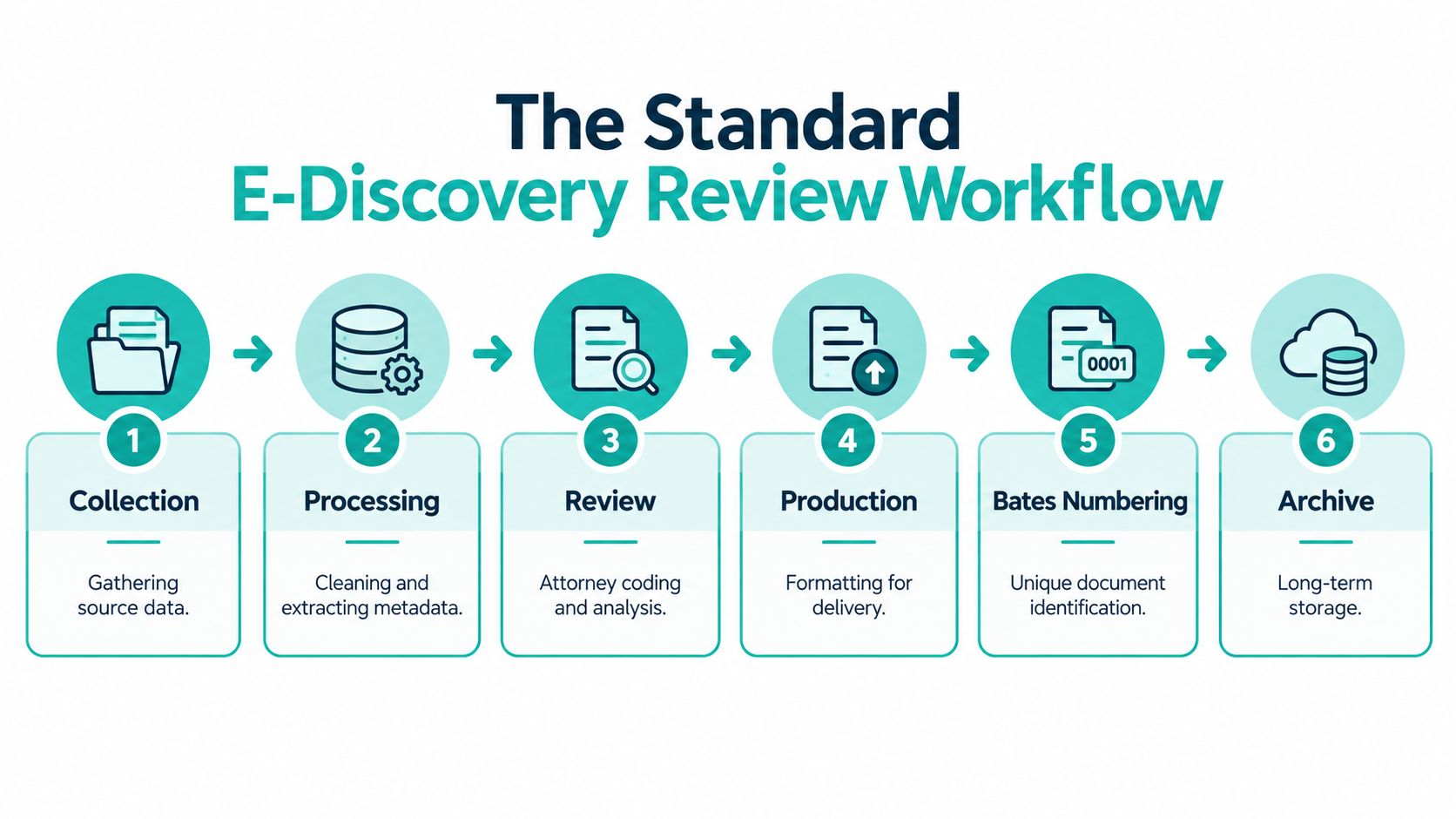
A defensible e-discovery project follows a defined sequence, even when the platform, team, or staffing model changes. Data moves from collection through processing, review, production, Bates numbering, and archive. Mapping each handoff shows where delays arise and where remote LATAM legal talent can control the 73% cost burden without weakening accountability.
Collection transfers data from custodians, systems, and other sources into the matter. A structured legal-intake workflow helps confirm who supplied the data, what was collected, and when the handoff occurred.
Processing removes technical noise, extracts metadata, and prepares files for search and review. Review applies the agreed coding decisions to determine how each document should be handled. Production formats the selected material for the client or opposing party. Bates numbering assigns each produced document a unique reference. Archive preserves the matter for later access and audit.
The sequence matters because an early defect affects every later stage. Poor processing can leave reviewers with incomplete text or broken document families. A rushed review can send errors into production. Inconsistent Bates numbering makes later references difficult to verify.
Assign an owner to every handoff. The collection lead should confirm when the dataset is ready for processing. Review managers should define completion and escalation rules before work begins. Production staff should verify the approved set before formatting and numbering.
Clear ownership also makes distributed staffing workable. Remote reviewers can handle defined first-pass tasks, while senior attorneys retain responsibility for exceptions, quality checks, and final decisions. That division keeps the workflow moving without blurring accountability.
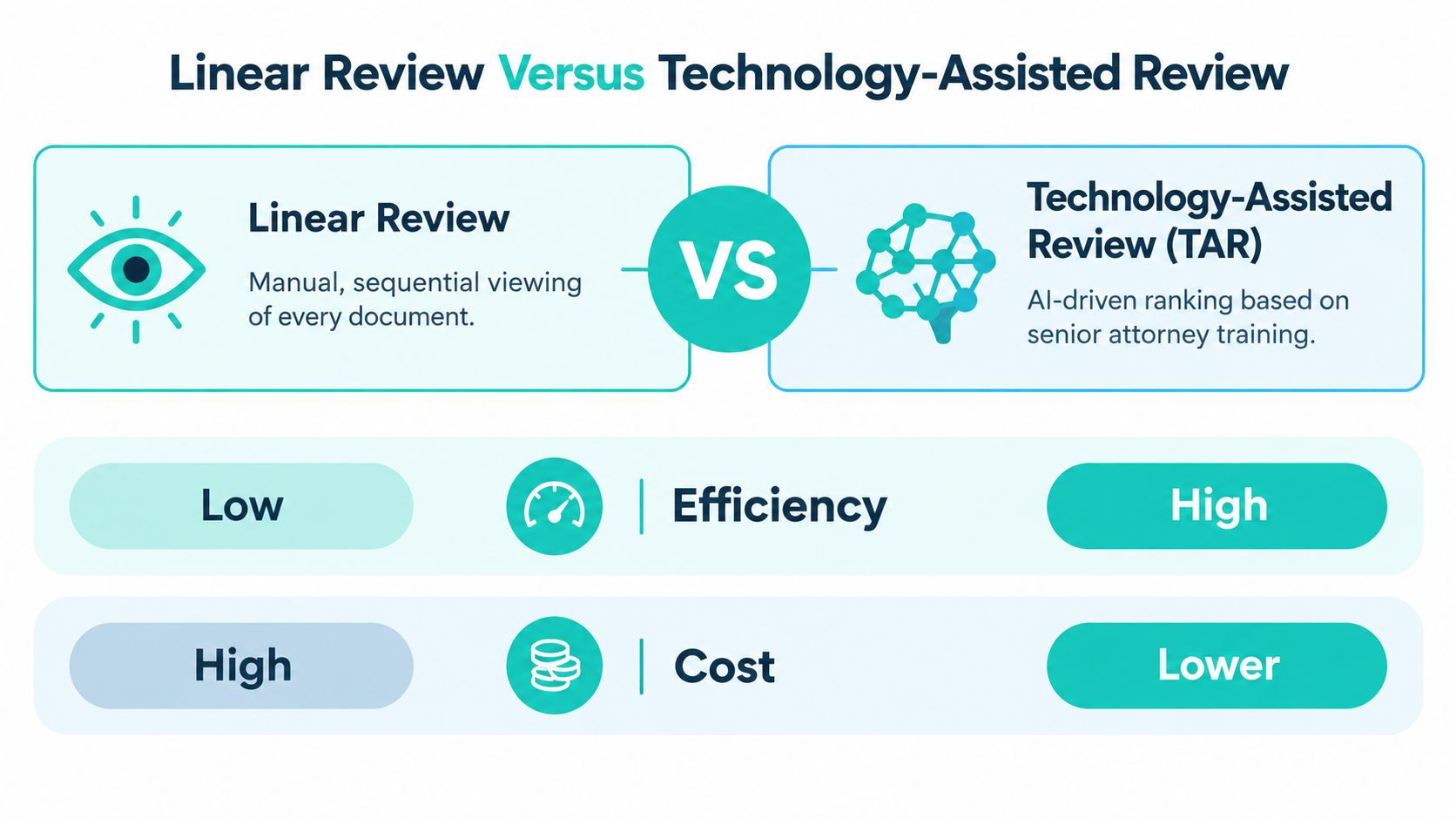
Linear review means people read documents one by one and make the calls manually. Technology-assisted review, often called TAR or predictive coding, changes that model. A senior attorney or subject-matter expert trains the system on a seed set, the platform ranks the broader corpus by predicted relevance, and the human team focuses on validation and exception handling instead of opening every file in sequence (Skadden explanation of predictive coding).
The practical difference is workload. Linear review keeps the pressure on human reading time. TAR shifts effort toward training, sampling, and quality control. That doesn't remove the lawyer from the process, and it shouldn't. It changes where the lawyer spends judgment, from every document to the subset that needs confirmation or escalation.
| Review method | Human effort | Strength | Limitation |
|---|---|---|---|
| Linear review | Sequential reading of each file | Straightforward to explain | Expensive and slow on large sets |
| TAR | Model ranks material for review | Reduces the volume needing full pass review | Requires disciplined training and oversight |
TAR is most helpful when the dataset is large enough that reading everything linearly is wasteful. It's less useful when the matter is narrow, the volume is modest, or the issue set is so bespoke that a model won't have enough consistency to learn from. In those cases, a tightly managed manual review can still be the cleaner path.
The key trade-off is control versus speed. TAR can reduce the amount of material that needs full linear attention, but it also demands good seed selection, careful validation, and a reviewer who understands when the model is wrong. That's why firms with mature workflows pair TAR with senior QC rather than treating it as a set-it-and-forget-it feature.
Remote legal staffing can reduce review costs when the assignment is clearly defined, repetitive, and governed by a written protocol. First-pass review, tagging, document sorting, privilege-log preparation, and intake coordination fit that structure. Counsel should retain higher-level privilege decisions, court-facing strategy, and final production approval.
The trade-off is management capacity. A remote reviewer can process routine work at a lower cost, but attorneys must provide usable instructions, answer exceptions, and audit results. Review teams also need access to the firm's document platform and technology-assisted review workflow, so remote staff can apply codes consistently without creating a separate process.
For firms that need bilingual support or U.S.-aligned hours, Virtual Legal Assistants provides screened legal assistants and related support roles through a remote staffing model for law practices. Its remote legal assistant support can cover document preparation, file organization, and other review administration while attorneys focus on issue selection, exception review, and final judgment.
Candidates need familiarity with legal files, close adherence to instructions, and discipline around defined scope. Suitable assignments include:
The staffing benefit includes consistency as well as lower overhead. A trained remote assistant can repeat routine steps across long review cycles, while attorneys concentrate on judgment calls and quality checks. The arrangement fails when instructions are vague or reviewers are expected to improvise.
Remote staffing works when the attorney defines the standard and the assistant executes within it. Clear escalation rules make that division practical.
Remote document review requires documented controls for access, scope, confidentiality, and audit records. Give each reviewer only the permissions required for the assigned task. The firm should also know where data is stored, who can open it, which actions are recorded, and how access is removed when the assignment ends.
Healthcare matters add specific compliance obligations. HHS defines a business associate as a person or entity outside a covered entity's workforce that performs services for the entity and needs access to protected health information (HHS business associate guidance). Covered entities must use written contracts or other arrangements with business associates, although HHS does not require them to monitor how associates carry out privacy safeguards (HHS FAQ).
A sound vetting process should cover:
Healthcare virtual assistant programs should include HIPAA privacy and security training, signed business associate agreements, and administrative, physical, and technical safeguards before staff receive PHI access (industry compliance guidance).
The same discipline supports attorney-client privilege. A firm should be able to identify who accessed the data, the business reason for that access, the systems used, and the controls applied. If those answers are unavailable, remote staffing has created an avoidable evidentiary and confidentiality risk.
Test the actual workflow before assigning files. Can the candidate or vendor work in Clio, Filevine, MyCase, or the platform the matter uses? Can they apply review instructions without improvising, escalate uncertainty, and maintain records? Can their working hours overlap with the U.S. team when approvals or handoffs require live coordination?
These checks matter more than a general service description. Remote support is workable when access is limited, supervision is defined, and the vendor can demonstrate reliable handling inside the firm's systems.
Document review is not a clerical back office task. It's the legal decision layer that determines what gets produced, what gets withheld, and how much a matter costs to run. The reason firms keep redesigning the workflow is simple. The review stage is expensive, high-risk, and too large to manage well through manual reading alone.
The firms that handle it better use a blended model. They keep attorneys on the judgment calls, use TAR where the dataset warrants it, and push first-pass administrative work to trained remote support that understands the process. That same model translates cleanly to healthcare-adjacent work, where privacy, access control, and documented procedures matter just as much.
If your review process still depends on ad hoc staffing and inconsistent coding, audit it now, before the next large matter lands. Map the workflow, define the handoffs, and decide which tasks belong with counsel and which can be safely delegated.
Virtual Legal Assistants connects U.S. firms with pre-vetted bilingual legal support professionals in Latin America who can help with document organization, intake coordination, case tracking, and other remote support tied to review-heavy work. If you want a structured staffing option that fits this kind of workflow, visit Virtual Legal Assistants and review how their team approaches legal support hiring.