

 17 minutes read
A prospective client calls while your attorneys are in meetings, submits a web form after hours, and then waits for someone to respond. By the time the office sees the message, the person may have contacted another firm. A remote intake specialist helps close that operational gap by owning the first structured contact with prospective clients, working from a monitored queue of calls, forms, emails, and chat messages.
The role is more than answering the phone. A well-managed specialist records inquiries, asks approved screening questions, books eligible consultations, follows up, and hands matters to the right person. They don't give legal advice, decide whether a case will succeed, or replace an attorney's judgment. They do make sure inquiries have a clear owner and next step.
This guide covers the daily workflow, how intake differs from other legal support roles, which skills to test, how to hire and onboard, and how to manage response and scheduling outcomes. The central operating principle is straightforward: treat intake as a controlled queue with written boundaries and measurable next actions, not as a loose collection of calls and administrative tasks.
A remote intake specialist owns the first structured contact a prospective client has with a law firm. Working outside the office, they monitor assigned channels, record each inquiry, apply firm-approved screening rules, and route the prospect to the next appropriate step. The work follows six stages: lead capture, first response, qualification, consultation booking, follow-up, and new-client handoff.
| Stage | Typical tasks | Record produced | Escalate to attorney when |
|---|---|---|---|
| Lead capture | Monitor web forms, missed-call logs, and referral emails; timestamp each inquiry | Logged lead with source and time | The inquiry names an existing client or a matter already open |
| First response | Make a personal contact, confirm identity and preferred contact method | Contact attempt recorded | The caller reports an urgent court date or deadline |
| Qualification | Check practice-area fit, jurisdiction, adverse-party names, and timing | Disposition code and intake notes | There may be a conflict, or the matter falls outside the firm's practice areas |
| Consultation booking | Offer only eligible slots from attorney calendars; send confirmation | Booked consultation with preparation instructions | An attorney has restricted the consultation type or calendar |
| Follow-up | Contact unbooked prospects on a set schedule and record responses | Updated lead status | The prospect asks about fees, strategy, or likely outcome |
| New-client handoff | Collect intake forms and documents; create the matter record | Matter opened after conflicts clearance | Conflicts aren't cleared or the engagement isn't signed |
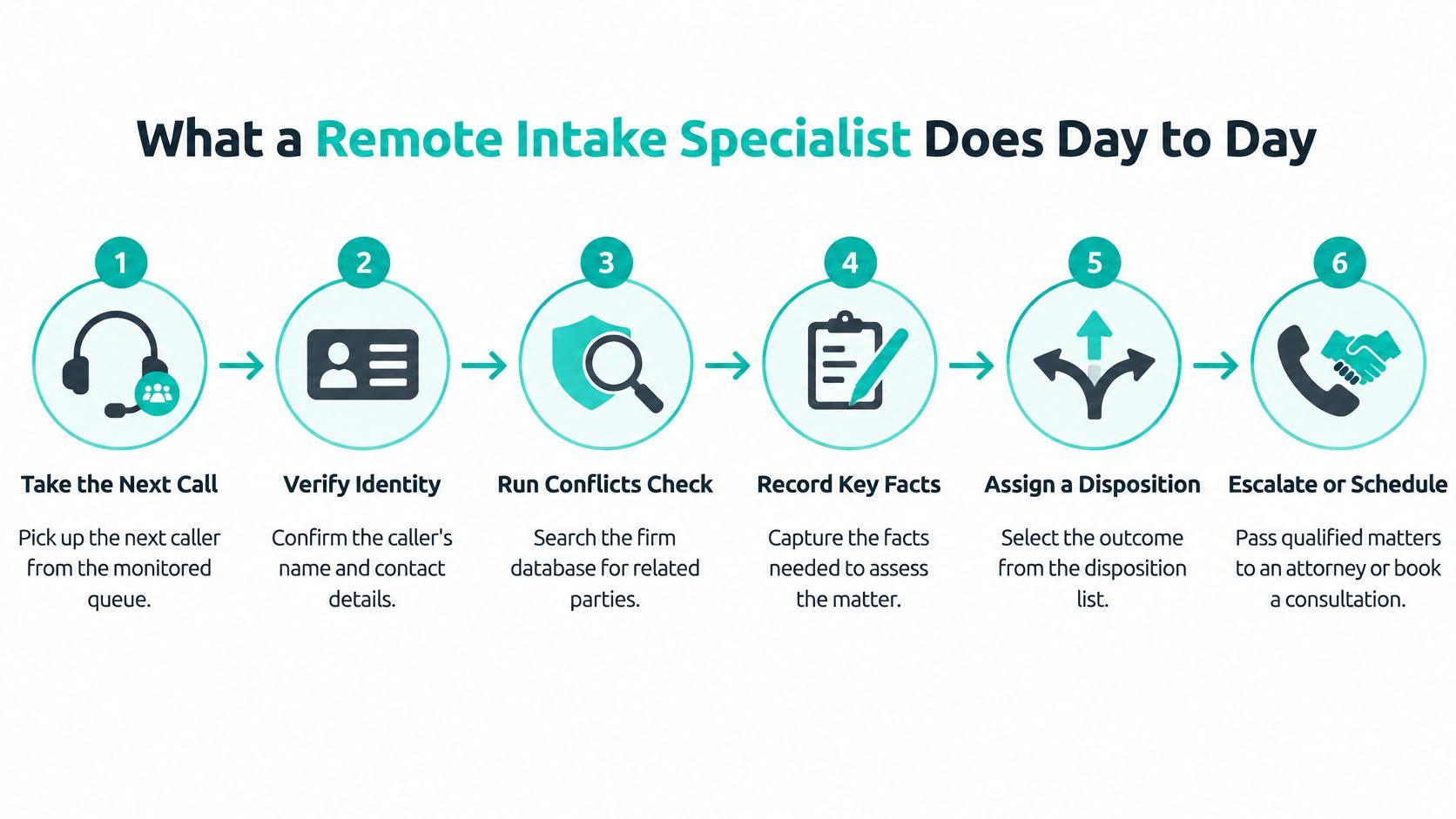
The 2024 Clio Legal Trends Report describes a substantial response gap among U.S. law firms. In its secret-shop study of 500 firms, 33% responded to emailed inquiries, while 40% answered calls. Overall, 52% either answered or returned a call, leaving nearly half effectively unreachable by phone. Even firms that responded didn't consistently explain next steps or costs.
That's why fast contact alone isn't enough. The specialist needs to capture enough information for the firm's approved screening process, explain the administrative next step without implying a legal outcome, and record who owns follow-up. A caller shouldn't have to repeat their story because a message sat in an inbox without a disposition or named owner.
The specialist can collect facts, use a firm-approved script, check whether required intake fields are complete, and route questions. They shouldn't give legal opinions, promise a result, clear a conflict, or set fees. If a caller asks whether a deadline is safe or whether a case is worth pursuing, the specialist records the question and escalates it.

Practical rule: Draw the six stages on one page and name the owner of each queue before you write a job posting.
The overlap between intake and reception creates an avoidable handoff problem. A receptionist may take a new caller's details informally, while an office manager assumes the receptionist will follow up. Meanwhile, the receptionist believes the office manager owns the next step. The prospect hears nothing, and the firm has no complete record of what was promised.
| Role | Primary focus | Typical prospect contact | Decision authority |
|---|---|---|---|
| Remote intake specialist | Lead response, qualification, booking, and new-client onboarding | Starts and follows up on new inquiries | None; escalates legal and conflict questions |
| Receptionist | Phones, messages, and appointments for existing clients | Routine calls and walk-ins | None; routes calls to staff |
| Virtual legal assistant | Calendars, document handling, and file organization for attorneys | Mostly internal or existing clients | None; works within assigned tasks |
| Case manager | Case activity, deadlines, record requests, and client updates | Ongoing clients | None on legal strategy; tracks decisions made by attorneys |
| Paralegal | Legal research and drafting under attorney supervision | Usually client-facing only under supervision | Limited to the scope the attorney and jurisdiction allow |
A three-attorney family law practice might have a front-desk coordinator answering calls and an office manager managing intake forms. After a busy stretch, two prospects go without follow-up because each person assumes the other owns the task. The fix isn't necessarily another employee. It's a defined queue, a disposition for each inquiry, and one accountable owner for the next action. For a closer look at front-desk responsibilities, see this guide to law firm receptionist duties.
Some workflows need a different arrangement. If callers may need immediate human triage during an emergency, the practice needs an appropriate emergency-routing protocol and qualified coverage, not just a remote administrator. A person disputing an existing bill should usually go to the staff member who handles billing or the relevant matter, rather than enter a new-lead workflow.
A firm receiving only a handful of inquiries a week may do well with a shared inbox and a written response rule, provided someone checks it reliably and owns each follow-up. In any setup, write a boundary sheet that specifies what each role may say about fees, deadlines, and outcomes. That prevents a well-meaning staff member from making a commitment they're not authorized to make.
A strong candidate listens carefully, speaks and writes clearly, and can follow a consistent process without sounding mechanical. They need to ask structured questions, capture facts needed for the firm's screening and conflict procedures, and select the right disposition. They also need a calm, respectful tone when a caller is frightened, angry, or confused. Test these skills directly instead of relying on a résumé or a claim of being “good with people.”

Bilingual English and Spanish ability can matter in practices that receive inquiries from Spanish-speaking clients, including personal injury, family, immigration, and civil litigation firms. But conversational fluency by itself may not be enough. Ask the candidate to conduct a short intake in Spanish, explain the firm's administrative process in plain language, and summarize a sample Spanish document accurately.
Use scenarios that reveal whether the candidate can communicate without overpromising. They should be comfortable saying that an attorney will need to answer a legal question, rather than translating an uncertain answer into polished Spanish. If your firm uses translated scripts or approved terminology, test those materials during the interview.
Experience with Clio, MyCase, Filevine, CASEpeer, SmartAdvocate, or Smokeball can shorten training, but “I've used it” doesn't tell you what a person can do. Working proficiency means being able to create a contact, log an interaction, move a lead through pipeline stages, add a calendar entry, and attach a document to the correct record.
Give the candidate a short task in a sandbox or a test environment in your own system. Check whether they confirm the right client or lead before saving, choose the correct record type, and leave a note another staff member can understand. That demonstration is more useful than asking which platforms they recognize.
The AI question is governance, not replacement. Thomson Reuters' 2025 legal-industry report reported that 28% of law firms were using generative AI in 2025. The same source notes that another legal-tech survey found nearly 60% of firms lacked specific AI guidelines. A remote specialist shouldn't have to guess which tools are approved or what information may be entered.
Prohibit unsanctioned public AI tools. If the firm approves an AI-enabled workflow, minimize personal information before automation, use access controls and logs, label machine-generated notes, and require a person to verify facts before communicating eligibility, deadlines, or legal conclusions. AI may assist with transcription, summaries, routing, or missing-field alerts, but the specialist remains responsible for checking what they pass along and escalating legal judgment.
Start with a written role brief. State expected inquiry volume in operational terms, coverage hours, languages, practice areas, required software, and who supervises the position. A vague brief attracts candidates whose experience may not match the work. Make clear whether the role covers only new inquiries or also existing-client calls, and whether the specialist can book consultations directly.
Score every candidate against the same criteria. The U.S. Bureau of Labor Statistics' occupational information offers context for the broader legal-administrative labor market: in May 2023, 152,790 legal secretaries and administrative assistants were employed in the U.S., with a mean hourly wage of $27.08 and mean annual pay of $56,330. These are benchmarks for the wider occupation, not a direct salary quote for a remote intake specialist. Use them as one reference point alongside local market conditions and the actual responsibilities you're hiring for.
| Criterion | Strong evidence | Weight (%) | Red flag |
|---|---|---|---|
| Written and spoken English | Clear, error-light writing and a steady, plain-spoken phone tone | 20 | Repeated misunderstandings during the test call |
| Spanish proficiency, when required | Conducts intake in Spanish and uses correct legal terms | 15 | Relies on literal translation or can't explain the process in Spanish |
| Intake judgment | Sorts scenarios into the right disposition without overpromising | 20 | Quotes fees or outcomes unprompted |
| Legal software proficiency | Has used a case-management or CRM system and can name the fields used | 15 | Can't explain how an interaction would be logged |
| Scheduling and calendar management | Handles time zones and conflicting slots without double-booking | 10 | Double-books a slot in the test |
| Confidentiality habits | Describes how sensitive data is accessed, stored, and shared | 15 | Unclear about personal devices, shared logins, or messaging apps |
| Availability and schedule fit | Overlaps the agreed coverage hours with enough margin | 5 | Overlap falls below the minimum you set |
The scenario test is often the most revealing step because it shows how a candidate behaves under pressure. A polished interview answer can hide a tendency to guess, quote fees, or reassure a caller about a deadline. If you use a sourcing service, it can help present candidates for your firm to evaluate, but your team should score the same test and make the final hiring decision. This guide to hiring a virtual legal assistant can help structure the broader hiring process.
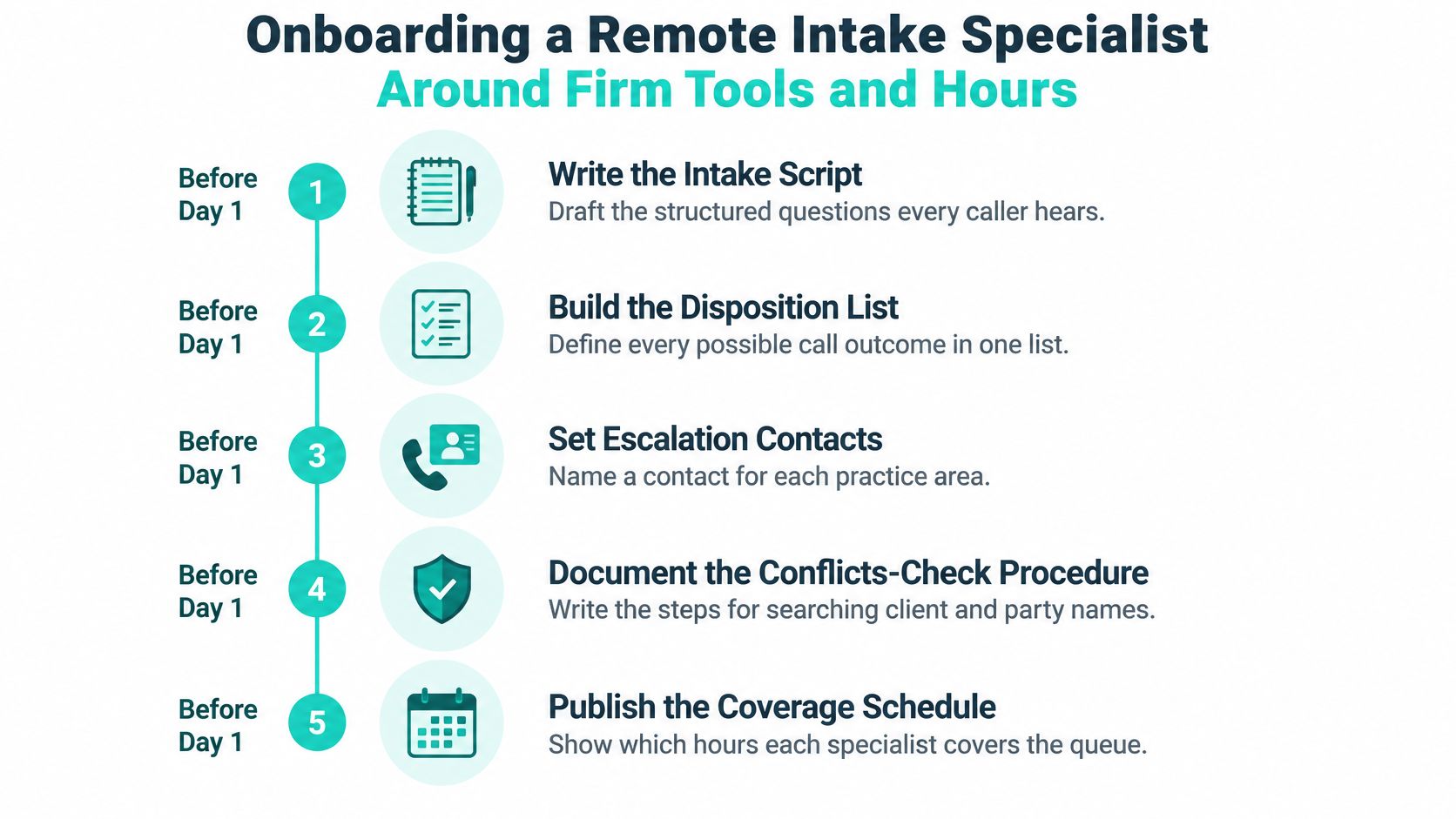
Before the specialist's first day, prepare the operating materials they'll need to make consistent decisions. Write the intake script, disposition list, conflicts-check procedure, escalation contacts for each practice area, and a schedule showing which attorney calendars the specialist may book. A specialist can't follow a rule the firm hasn't documented, and informal knowledge is easy to lose during staff changes.
Remote access needs a security design, not just a login. HHS guidance on securely teleworking in healthcare discusses controls such as VPN technology, multifactor authentication, secure remote-access procedures, worker training, and IT support. Legal practices should establish their own appropriate access rules, including individual accounts, least-privilege permissions, secure handling instructions, and a documented process for granting, reviewing, and terminating access. Requirements depend on the information and obligations involved, so confirm the firm's specific duties with qualified compliance professionals or counsel.
Heavy supervision can slow the first month. It's still preferable to letting a new hire improvise on promises, conflicts information, or attorney calendars.
Write coverage hours and the offline handoff in advance. For example, the procedure might direct after-hours forms into a queue that a named staff member reviews at opening. Also document how to use legal case-management software within the firm's workflow, so records don't end up in personal files or disconnected tools. When the role ends, revoke access on the last day and confirm the return of any firm-issued device.
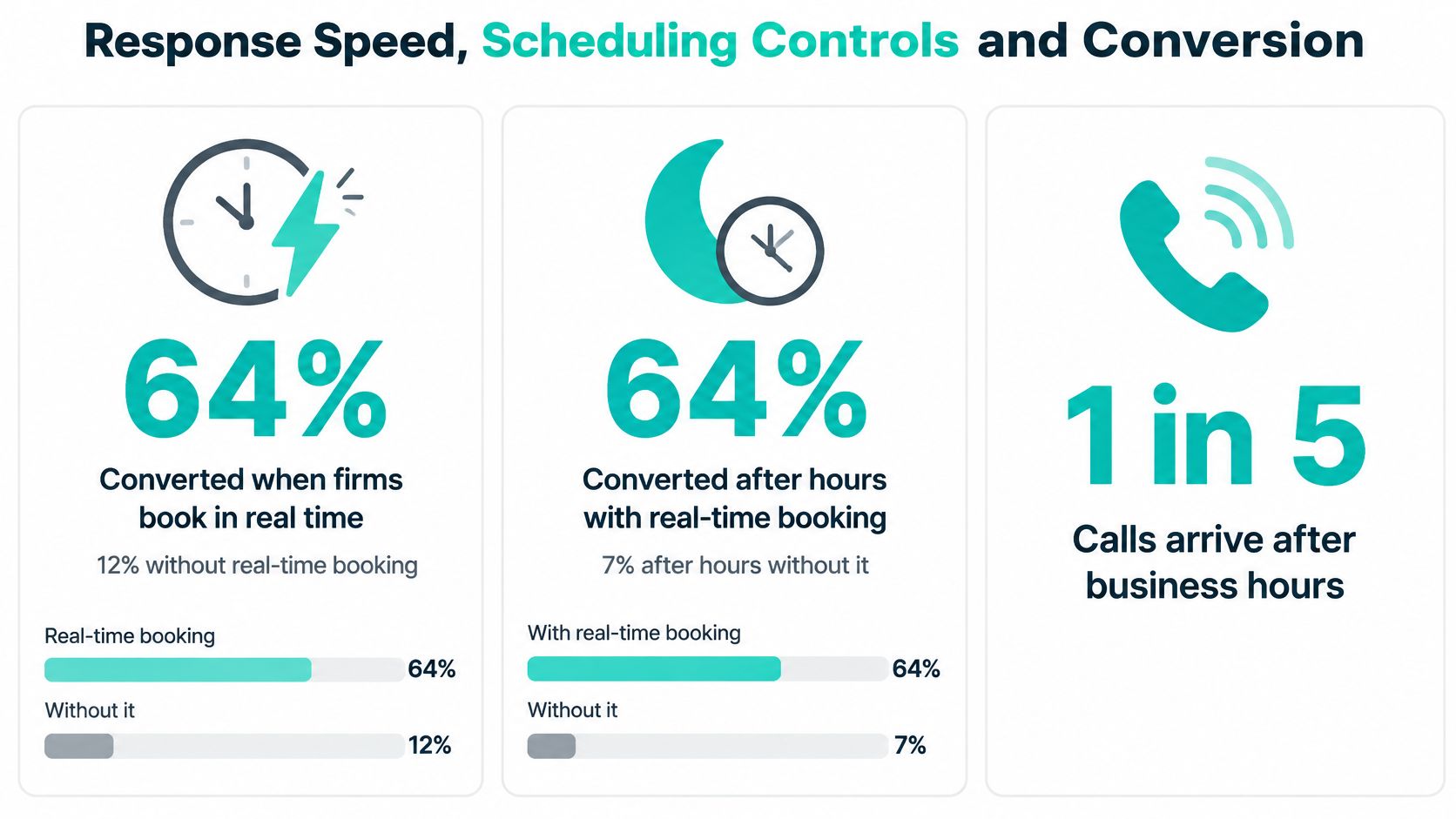
When a qualified caller is ready to book, offering an approved appointment during the call gives the firm a different opportunity than promising a later callback. An analysis of 32 million law-firm calls reported that qualified callers converted at 64% when firms could book in real time, compared with 12% when immediate scheduling wasn't available. After hours, the comparison was 64% versus 7%, and about one in five calls occurred after hours, according to the reported analysis of law-firm call outcomes. Treat those figures as a reason to test live scheduling, not as a forecast for your firm.
An automated acknowledgment confirms that a form arrived. It does not count as personal contact. In Hennessey Digital's 2025 U.S. study of 1,333 law firms using standardized online lead submissions, the median time to a first personal response was 13 minutes. 25% responded within five minutes, while 39% took more than two hours or did not respond, according to the 2025 lead-form response-time study.
Set a first-contact target and make each inquiry someone's responsibility. Route web forms, missed calls, and referral notifications to one monitored queue. Assign an owner and timestamp to every item, with an initial human contact target of five minutes. If no attempt is logged, alert a backup owner. The target is useful only if the firm can see missed items and act on them.
Track median and 90th-percentile first-response time, the share contacted within five minutes, contact rate, qualification rate, consultation-booking rate, and lead-to-retainer conversion. If the firm can record them consistently, add booking completion, no-show rate, time from qualification to appointment, and after-hours recovery rate. Review results by lead source and practice area. An overall average can hide a slow channel or a queue that consistently misses its target.
Before offering an appointment, confirm practice-area fit, jurisdiction, conflict-screening prerequisites, urgency, contact details, and consultation type. Follow the firm's rules about what staff may collect before conflicts clearance, and limit sensitive facts to what is needed at that stage. The specialist should offer only available slots approved for that consultation type. Calendar access does not authorize staff to make exceptions to attorney availability.
A booking should create or update the lead or matter record and trigger the firm's standard confirmation and reminders. Every inquiry also needs a disposition and a next action, so the queue shows what happened and who owns any remaining work.
| Disposition | Use when | Next action |
|---|---|---|
| Qualified and booked | Practice-area fit, jurisdiction, and conflict prerequisites confirmed; slot accepted | Send confirmation and reminders; open or update the matter record |
| Qualified, follow-up | Fit confirmed but no slot accepted or details are incomplete | Schedule the follow-up and log the date |
| Not qualified | Outside the firm's practice areas or jurisdiction | Send approved decline language and any approved referral resource |
| Duplicate | The same prospect is already in the queue | Merge records and keep the original timestamp |
| Unreachable | Attempts made within the set window with no response | Log each attempt and move to the scheduled retry |
| Attorney review | A conflict, fee, urgency, or legal question has been raised | Route to the named attorney with notes and a timestamp |
If the calendar cannot connect to the intake tool, use a twice-daily booking batch with a named owner and cutoff time. This is less immediate than live booking, so track how long prospects wait and whether appointments are confirmed. A disconnected calendar should create a clear handoff, not a collection of unowned callback notes.
Hypothetical example: A personal injury practice receives about 40 web leads a week and adjusts coverage so a specialist can respond sooner. Median response time falls from two hours to eleven minutes. That change deserves review, but it does not establish that intake improved on its own. Compare contact, qualification, booking, and retention outcomes over time, and check whether lead source or lead quality changed in the same period.
Faster contact can reduce delay and give a prospect a clear next step. It cannot create attorney capacity. If there are no eligible consultation slots, staff the queue around actual availability or change the booking rules with attorney approval. Conversion also varies by practice area, fee structure, and lead source. Use industry findings as context, then judge the workflow by the firm's own recorded outcomes.
A remote intake specialist is best understood as the accountable owner of a structured queue, not a substitute for legal judgment. The role can suit firms that need dependable inquiry coverage, consistent follow-up, or language capability, but it won't fix an undocumented workflow or replace appropriate attorney review.
Start by documenting the intake stages and disposition codes, then set a first-response target with an escalation rule. Write the boundary sheet, score candidates consistently, and review the workflow against written targets at day 30. Those steps give the specialist a clear process and give managers a way to tell whether the role is doing useful work.
Virtual Legal Assistants can share interview-ready profiles of English- and Spanish-speaking professionals with U.S. law firm experience, matched to your intake workflow and schedule. If you want to compare candidates for this role, visit Virtual Legal Assistants.